Editing a project in less than 24 hours for delivery the next morning can be stressful. Getting the footage less than 15 hours before delivery makes it even more stressful. And working in a foreign environment with production crew coming and going with an un-tested setup can easily double all that stress.
But somehow, it all worked out.

3 Days
50 Minutes of Total Content
20 Hours to Delivery Each Day
3 Delivery formats
2 Editors
Just got back from Las Vegas where I was the supervising editor on the International Builder Show’s IBStv. I’ve worked on the show for the past three years and used three different editing setups, each year with it’s own challenges, but this year was by far the smoothest. One of the key reasons being, that we’ve switched to an all Adobe Creative Cloud workflow.
Relying on a completely Adobe workflow from ingest to delivery has simplified quite a bit of the process. Especially being able to build the Lower-3rds as a template in After Effects (more on this) and insert the text easily without having to go into a full graphic editor or open up another program to build on the fly.
SYSTEMS
We were working on two of the latest Mac Pro’s with a 10-Terabyte LaCie 5big Thunderbolt 2 shared over direct link ethernet. Being that we left all of the footage in it’s native format (XDCam 422) the data rate wasn’t causing much (if any) slowdown over the 1Gb/s connection. Using Ethernet wasn’t my first choice. I was hoping to use the faster connection of Thunderbolt as I had previously done here. For some reason the Thunderbolt connection was refusing to assign IP’s correctly and kept failing on us. We didn’t have time to troubleshoot thoroughly so I’m not sure what the issue was yet. Once our systems get back from Las Vegas I’m planning to set up and try to reproduce the failure, then find a solution.
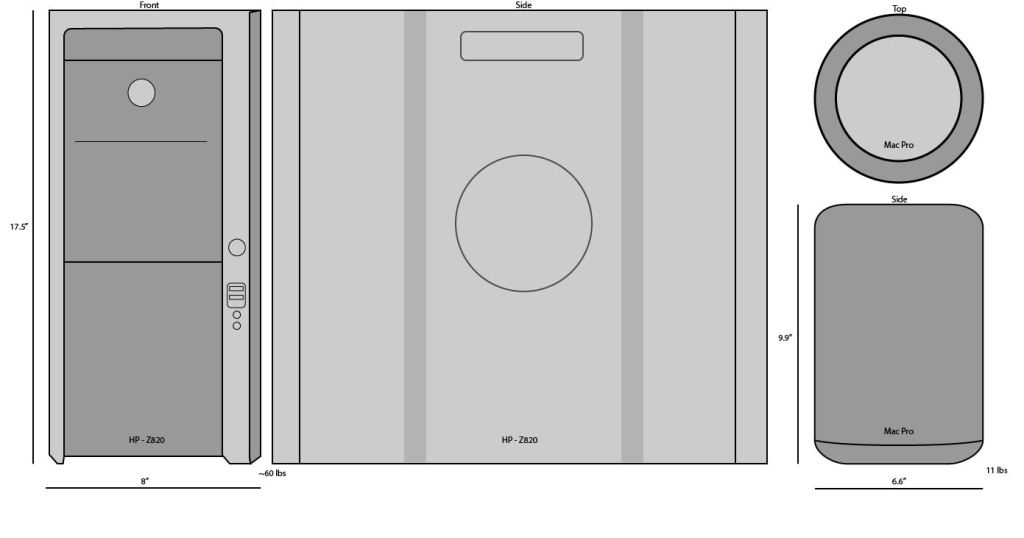
Aside from the Thunderbolt issue, our shared storage worked much as desired. In years past, we had to deal with editing on laptops, multiple hard-drives floating back and forth while duplicating assets as they came in. Last year we attempted to edit on Windows HP Z820‘s. Extremely fast machines, but not being as familiar with the Windows OS in an editing workflow cost us a lot of time and headaches. Plus the stations were bulky, heavy and loud. Using the new Mac Pro’s was nice because of familiarity with the OS as well as the smaller footprint they take up both in shipping and office space.
For less than half of the size and weight of a single HP, we could ship two of the Mac Pro’s. (They fit beautifully into a pelican case by the way, I packed them in their original packaging too for added protection.) I even considered just carrying mine on the plane with me, but I was already carrying my laptop and a backup hard-drive.
WORKFLOW
Our workflow for the show was pretty simple. The shooter was using the Sony HDW-F900 from which he would hand off the SxS cards to me throughout the day. I would import using Sony’s XDCam Transfer software (kind of annoying but really fast once you get the proper drivers installed and functioning). From there I would load the footage into a Premiere project (I called it ProjectName_LOG.prproj) keeping this project separate is important because it allowed both myself and the other editor to import the entire Log project into our show edit projects each time a new card was imported and logged, and it would import only the new card with logged info as organized with bins. (Premiere also has the option to import duplicate files, but we wanted to avoid duplicate assets in our projects.)
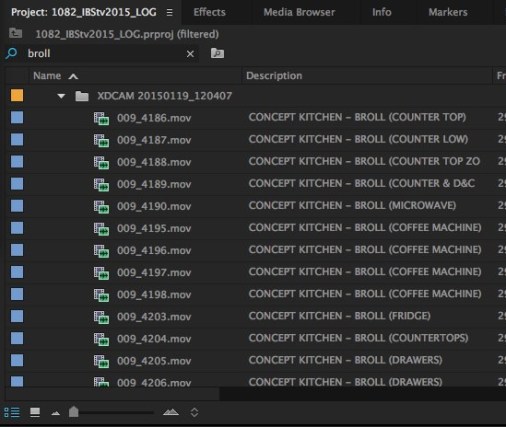
The Log project was only being used to organize the footage (nothing else, no sequences) for I would go through and label the footage in the Description and Notes tabs based on the AP’s field notes. Taking the time to go through and label all the footage (ie. BROLL, Good, Bad, Bicycle, standup, Interview, etc) was crucial as it saved both myself and the second editor an unknowable amount of time (but a lot) while editing segments and interstitials.
Once the footage was logged, the other editor and myself would import the Log project (as described above) and instantly be able to use the Filter Bin Content function in the Project browser to find what we needed at any moment based on the log information instead of having to click through each clip or use system power looking through thumbnails.
Using this particular organization method took a little bit more time during import but saved a lot of time in edit and ensured that we were both working off all of the same assets with the latest log information and referencing the correct asset names. Had we had an assistant editor to import and log, it would have been even more efficient.
In editing each days show, we decided to split up editing the segments and assembly of the full show. I decided to take on ingest and logging while editing the segments, which I would then hand off to the other editor once each one was finished for assembly into the show and final polish. We were able to use this method because I made each segment it’s own timeline which the other editor could then import the selected sequence from my project, again making use of Premiere’s ability to link sequences to existing assets within the project instead of importing duplicates.
DELIVERY
Once we were finished assembling the show we did a full render / proof watch, made corrections and then did a ProRes 422 export as our master. From there we had to deliver in four different methods H.264’s to YouTube and Brightcove, a higher bit-rate H.264 to a flash-drive for display all around the convention center on TVs, and then the real kicker, 75 DVD’s for all of the shuttles and busses taking attendees back and forth from their hotels and other destinations around Las Vegas. This became an issue because for one, the MacPro’s don’t have a built in optical drive. Easily remedied by buying an external USB drive for under $15. But the other issue was that Adobe no longer supports it’s DVD burning software Encore, which was discontinued with CS6 and never made it into the Creative Cloud family. Fortunately Adobe does allow users to download Encore, but only as part of the legacy Premiere Pro CS6 which on the convention center’s extremely slow broadband took well over an hour to download and install. Why Adobe doesn’t allow users to download Encore as a stand-alone legacy product is beyond me, but at least it’s still available in some fashion. The deliverable that took the longest surprisingly was not the DVD’s though, it was the uploads to YouTube and Brightcove. Because the internet at the convention center was so slow (wired not WiFi) it took over two hours to upload each night.
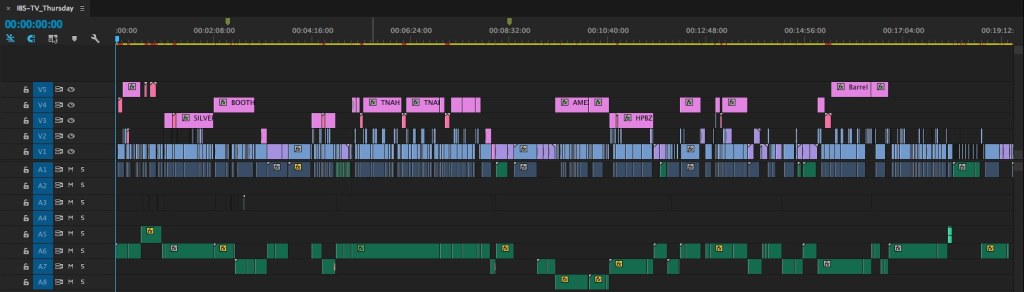
All told we edited 50 minutes of content over 3 days with a total of 47 segments.
 Eric Stenmark | Video - Animation - 3D Art