New in the Adobe CC 2014 release of After Effects and Premiere Pro is a great new feature called After Effects Templates. This feature allows a graphic to be made once, and have the text editable inside of Premiere Pro’s effects pane. So far this feature is only available for text layers, not for changing color or font style etc.
This does have some pretty terrific uses, especially for things like lower thirds or show titles that are built into effects sequences. I’ll go over the process for setting up a basic project for a lower 3rd. Here is a download link if you’d like to follow along at home. I’ve included two pre-built custom Lower 3rd for you to use as you will!

Starting in After Effects (must be version 13.0.2 or newer) Begin building your desired template, for this one I’ll be building a simple lower third. ( NOTE: You can also easily modify old projects to be templates following this same process.)

Now that I’m done building my composition, I’ll go into my composition settings. Under the “Advanced” tab, there is a check box that says “Template”, check that box and hit OK and Save the After Effects project.

Moving over to Premiere Pro, I’ll go File -> Import, and select the After Effects Project I’ve just created.

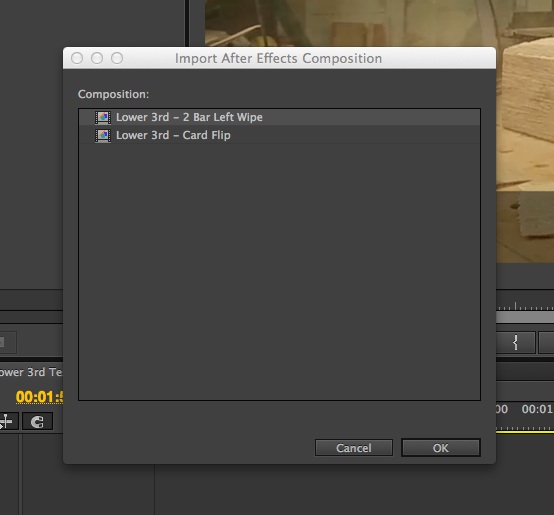
Premiere will ask which Composition to import, if you’re using the project I’ve supplied there will be two. I’ll be using the 2 Bar Left Wipe.
Once imported, it will appear in the Bins just like any other clip.

A quick double click and pop over to the “Effect Controls” panel and there should appear some options for “After Effects Editable Text”!

This has to be selected from the Bins, for some reason these options do not appear in the Effects pane when opened from the timeline.

This same technique can be used for much more complex projects, but this is the most useful method I’ve had so far which has saved me from having to open up and re-export a new lower 3rd for each interview.
 Eric Stenmark | Video - Animation - 3D Art
One thought on “Intro to After Effects Templates for Premiere Pro”