As independent film makers, we always try to do as much ourselves as we can. But as everyone knows once they make their first film, you can’t do everything yourself.
Film-making is always talked about as being collaborative, and the post-production workflow is no exception. Part of what I do on a daily basis is maintain and manage a networked shared storage solution, ours is a bit larger than what is accessible to smaller productions (96 Terabyte – 8Gb fiber SAN) but I was recently asked to help set up a smaller shared storage solution and thought I would share my experience as this has always been something I’ve wanted to do for some of the smaller productions I’ve worked on.
Shared access to media assets is the holy grail of post-production workflows. If you’ve ever worked on projects where there are multiple editors/colorists/VFX artists using multiple hard-drives all labeled “Edit1”, “Edit2”, “Steves Orange Drive” or “Dont Touch!” with multiple copies of the assets spread around each drive, different versions of projects and missing media. You know that trying to keep them all up to date and organized is a nightmare. Inevitably some files will either get written over, or just go missing no matter what keywords or tags you search for.
For years in college I looked for an affordable, fast way to share assets between machines so that me and my friends could all work with the same assets simultaneously without needing innumerable multi-terrabyte hard-drives bouncing between stations. I had worked with XSAN’s, Terrablocks and custom built fiber connected servers, but each one cost a minimum of $30k for just the chassis. The only options I could find at the time were slow network access drives like the Western Digital World Book II which would hook up to your home network via ethernet and allow you to access it via a web-portal or ftp, or doing drive sharing between machines over extremely slow ethernet.
Recently I was approached by a fellow editor who was looking to set up a shared storage solution on the cheap for a client he is going to be working with for the next few months. Neither of us claim to be engineers, but we’ve both worked with quite a few various shared storage solutions and have a decent amount of networking and hardware knowledge between us, so we started researching and brainstorming a good solution for their workflow.
Because he is using some older storage RAIDs that he wants to keep using, we wound up setting up a server station for him that hooks up via two ethernet cables to a network switch which then shares the connection to each of his edit bays. This solution works for him because of his prior media, but in my searching I found a new way (at least for the Mac users out there) to easily and cheaply share media between multiple computers.
In early 2011, Apple and Intel introduced their new data transfer connection “Thunderbolt”. Thunderbolt had the promise of high data speed and multiple many different connection possibilities, but nobody was really sure what all it could be used for. Sure I could hook up a really fast storage drive, and monitors, and speakers, and other…stuff I guess, but what could it do in the edit bay that USB 3.0 and PCI couldn’t already do? That thing that it can do, is direct connected high speed shared storage.

Thunderbolt has implemented what is called TCP/IP or network bridge.
Using the Thunderbolt Bridge, we are able to directly connect from one machine to another using just a Thunderbolt cable. Once “File Sharing” is activated in the System Preferences, logging in through the Finder’s “Shared” panel allows users to see all of the connected storage to the host computer. (In this instance I am connecting my MacBook Pro to the MacPro which is sharing a LaCie Rugged 2TB Thunderbolt, and a WD USB 3.0 500GB)
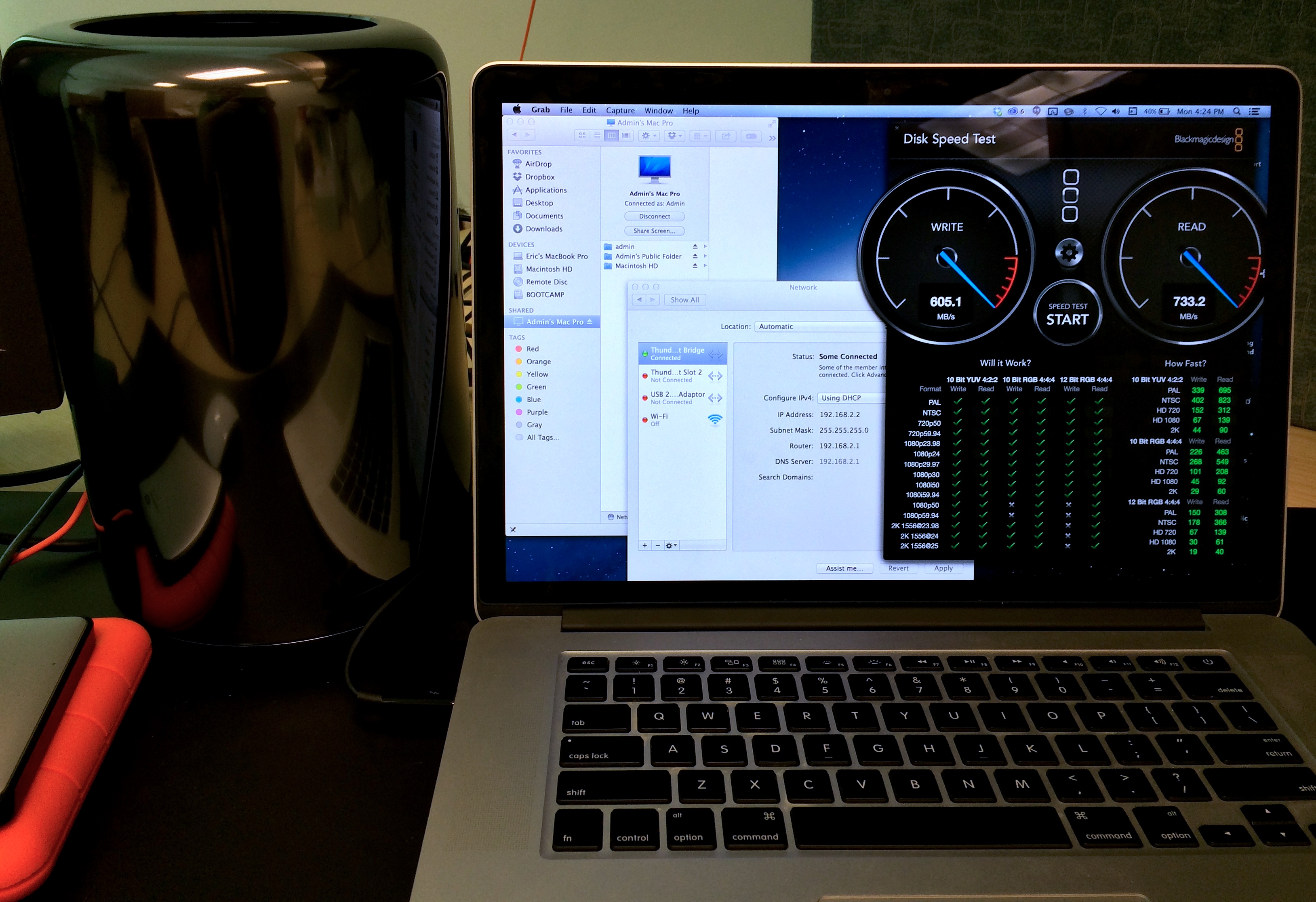
Using this method, both computers can share and edit with the same media at the same time. That being said, there will be some slow-down for the second editor who is not directly connected to the storage. I performed my own speed tests using some files I had on my computer as well as the BlackMagic Design “Disk Speed Test” app from the App Store.
Here are my results
When writing to the internal of the MacPro from the MacBook Pro –
605.1 MB/s Write | 733.2 MB/s Read
20GB – 47 seconds to internal
When writing to an external hooked up to the MacPro from the MacBook Pro –
20GB – 3 min 54 seconds to external 2TB LaCie Rugged – hooked up via Thunderbolt (USB 3.0 was similar at 4 min 15 seconds)
Reading and writing to a shared external drive is much slower than writing to the internal SSD of the MacPro, but it is still much faster than LAN over Gigabit Ethernet and much simpler and cheaper than setting up a server or NAS, plus you can use the external hard-drives you already own. Ultimately, this could be a cheap, easy and fast solution for those independent film-makers looking to share their media between editors working in the same space.
 Eric Stenmark | Video - Animation - 3D Art
One thought on “Shared storage for the Independent Filmmaker”